The real-time cost of every meeting, on the screen of every meeting
Fire Meetings shows a live $ burn counter inside your Google Meet screen, then turns the resulting attendance data and meeting transcript into AI-driven cost & time savings insights.
Free to use, no card needed. Anyone can sign in to see their own meeting data — the first person from your company to sign in sets up the organization dashboard.
Live $ burn and time counters run right inside every Google Meet, on the side panel and main stage — so the cost of the room is visible while it's happening.
Meeting Insights surfaces low-value, oversized, and recurring meetings to shorten, cancel, or make async — turning wasted hours back into focus time.
Trends, savings opportunities, and per-user and per-team reporting roll up across your organization — no manual timesheets, nothing to remember to turn on.
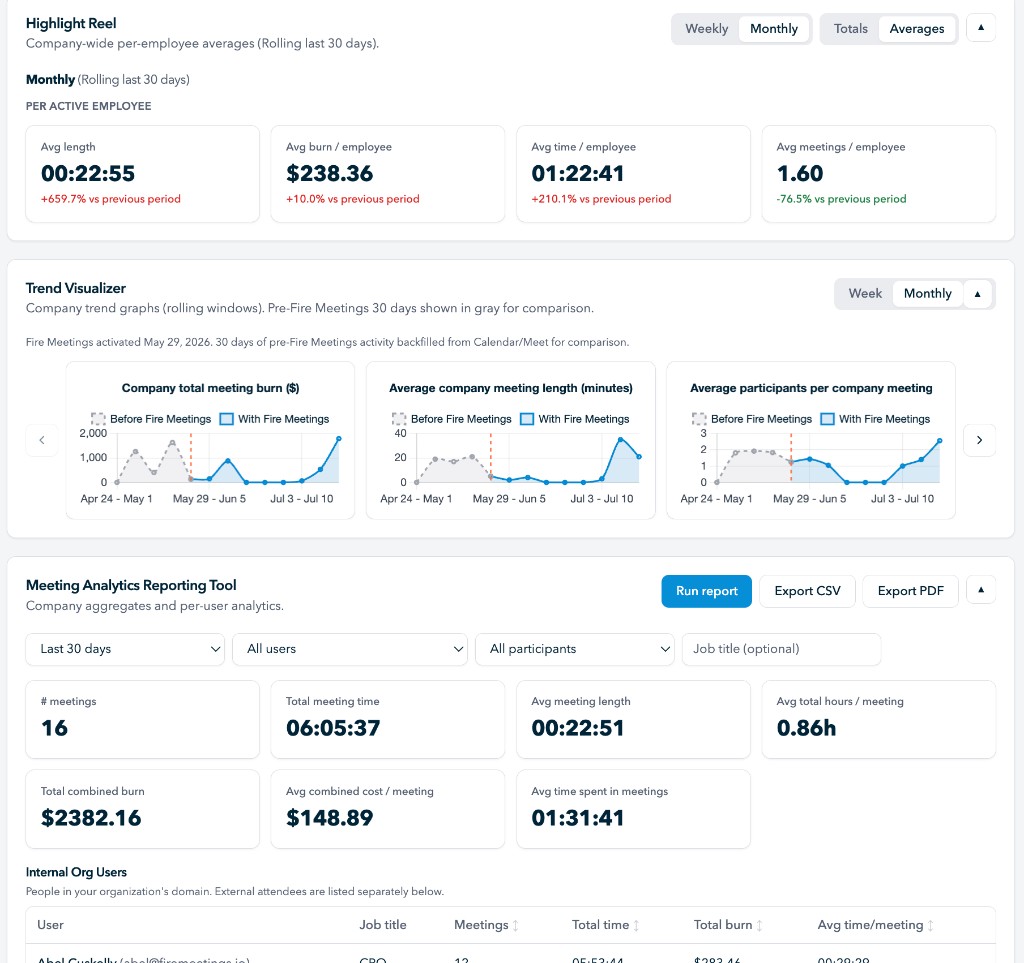
Dashboard
email (required), name,jobTitle,team,annualSalaryUsd,hourlyRateUsd (all optional — include just the ones you have). Hourly/annual mirror each other server-side. Existing users are merged by email.| Recommendation | Meeting / person | Why | Est. monthly savings |
|---|
| Employee | Avg minutes late | Late arrivals | Meetings measured | Worst arrival |
|---|
| Employee | Scheduled | Actual | Difference | Actual ÷ scheduled | Meetings measured |
|---|
| Employee | Speak rate | Meetings | Avg speak share |
|---|
| Employee | Passive rate | Meetings | Silent meetings |
|---|
Unlocks at end of month 3 of org meeting tracking.